You just joined Flipboard. Here is what to do first.
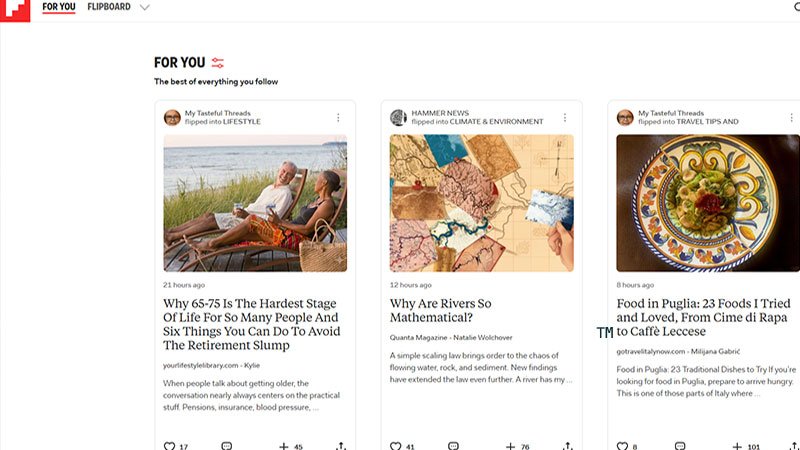
Welcome. You made a good decision.
Now take a breath, because Flipboard is not like the other platforms you already know. There is no pressure to post immediately, no follower count to obsess over on day one, no algorithm punishing you for not being active enough in your first 48 hours.
Flipboard rewards curators, not performers. And curation is something you learn by doing, not by cramming.
So here is the deal. This article gives you the basics to start right. Not everything there is to know, just what matters today. You will learn the rest as you grow with it. That is exactly how it is supposed to work.
Step one: build your profile properly
Before you do anything else, your profile needs to exist.
This sounds obvious. It is not. A lot of new users skip this step and wonder later why nobody follows them back.
Your Flipboard profile is your identity on the platform. Other curators and readers will look at it before deciding whether to follow you. Give them a reason to say yes.
Here is what to set up:
- A real display name. Not a random username. Your name, your blog name, or your brand. Something that tells people who you are at a glance.
- A profile picture. A clear headshot or a recognizable logo. Anything that makes you look like a real person with a real presence.
- A short bio. You have 150 characters. That is one good sentence. Make it count: who you are, what you curate, and the keywords that define your niche. Flipboard's search engine reads your bio, so if you cover slow travel, plant-based cooking, or indie music, say so plainly. No need to stuff # symbols in there. Your topic words are read either way. And do not bother adding your website URL. Links in the bio are not clickable on Flipboard. There is no dedicated field for it either. Your magazines and the content you flip are how people find their way to your site.
Think of your profile as a business card. It takes five minutes to set up properly. Do not skip it.
Step two: follow topics you actually care about
Flipboard has over 30,000 topics you can follow. That number is not there to overwhelm you. It is there to show you how specific you can get.
Do not just follow "Travel." Follow "Solo Travel" or "Van Life" or "Japan Travel." The more specific your follows, the better your For You feed becomes. And a good For You feed is what makes Flipboard enjoyable to open every day.
Follow a mix of broad topics you love and niche ones you are an expert in. Both matter, for different reasons. The broad ones feed your curiosity. The niche ones show the algorithm where you belong.
You can also follow other curators and their magazines directly. When you find someone curating content you love, follow them. That is how communities form on Flipboard. Quietly, around shared taste.
Step three: create your first magazine
This is the moment Flipboard shifts from a reading app to your platform.
A magazine on Flipboard is a curated collection of content from anywhere on the web. Articles, newsletters, videos, podcasts. Anything with a URL can be flipped into a magazine. And anyone on Flipboard can follow your magazine and read what you put in it.
A few things to get right from the start:
-
Go niche, not broad. This is the mistake most beginners make. "Travel" is not a magazine strategy. "Solo Travel in Southeast Asia" is. "Plant-Based Recipes for Busy Weeknights" is. The more focused your magazine, the better Flipboard's algorithm understands what it is about, and the more likely it is to surface your magazine to readers searching that exact topic. Flipboard has topic feeds with millions of followers. A niche magazine feeds directly into those. A broad one gets lost.
You can absolutely create a general magazine as a catch-all feeder, a place where everything loosely related to your world lands. But build the niche ones first. They are where real discovery happens.
-
Write a proper description. One or two sentences explaining exactly what the magazine is about. This shows in search results and helps new readers decide whether to follow in seconds.
-
Start flipping. Use the + button you will see on every story inside Flipboard, or install the Flipboard browser extension to flip articles directly from any website you visit. Add a short caption when you flip. It does not have to be long. A sentence that tells readers why this article is worth their time is enough.
Do not wait until you have ten articles to publish. Start with three. A real magazine with three good flips is better than an empty one waiting to be perfect.
Step four: flip something today
Reading without flipping on Flipboard is like browsing a bookshop and never buying anything. Perfectly fine, but you are missing the point.
Flipping is the core action on Flipboard. It is how you build your magazine, contribute to the community, and signal to the algorithm what you are about.
When you find an article worth sharing, ask yourself one question: which of my magazines does this belong in? Then flip it there. Add a caption. Move on.
That is it. That is the habit. Once it clicks, it takes about ten seconds per article.
One important note: Flipboard only accepts links to original sources. When you flip something, the reader is taken directly to the publisher's website. No copies, no reposts, no paywalled versions. That respect for original content is part of what makes Flipboard worth building on.
What you do not need to worry about yet
A lot of things about Flipboard will make more sense after a few weeks. Storyboards, group magazines, analytics, federation with the Fediverse, the Creator Collective program. These are all real and worth exploring eventually.
Not today.
Today, your only job is this: a complete profile, a focused magazine, and your first few flips.
Everything else will come. The platform rewards consistency over intensity. A curator who flips five good articles a week for six months will always outperform someone who flips fifty articles in their first week and disappears.
One tool worth installing from day one though: FediBoard. It is our free browser extension that adds a powerful side panel to Flipboard's web app, giving you cleaner access to your stories, notifications, and followers from the start. And as your magazine collection grows, FediBoard's magazine list management becomes the tool that keeps your curation organised by topic, so you always know exactly where to flip and what you have already covered. Start with it installed. You will thank yourself later.
One last thought
Good curation is the foundation. But it is not enough on its own.
Flipboard is a discovery platform, and discovery works in two directions. People find you through the algorithm, yes. But they also find you because you told them where to look.
Share your magazine URL on your social accounts. Add a Flipboard icon to your website alongside your Instagram and Pinterest links. Mention your magazine in your newsletter. Embed a magazine widget in your sidebar. Every time you add significant new content, share the link again. Your audience will not come find you if they do not know you are there.
Build it well. Then tell people about it.
That combination, great curation plus active promotion, is what separates the curators who grow from the ones who wonder why nothing is happening.
You are already ahead of most people by starting. Now go flip something worth reading, and then tell someone about it.
Quick start checklist
Before you close this tab, here is everything covered in one glance.
Your profile
- Display name set (your name, blog name, or brand)
- Profile picture uploaded (headshot or recognizable logo)
- Bio written (150 characters, keywords included, no URL)
Your first magazine
- Topic chosen (niche, not broad)
- Title and description written
- At least three articles flipped in with captions
Your reading feed
- Niche topics followed (specific, not just broad categories)
- A few curators or magazines followed in your space
Your first flip
- At least one article flipped today
- Caption added explaining why it is worth reading
Your promotion
- Magazine URL shared on at least one social account
- Flipboard icon added to your website (or scheduled to do it)
One step at a time. You do not need all of this done today. But every box you tick makes the next one easier.
One last thing. Flipboard can feel quiet at first. You flip, you build, you wait. That is normal. But you are not doing this alone. FediBoard was built precisely for that moment, to connect curators to each other, to the Open Social Web, and to an audience that is looking for exactly what you curate. The community is there in the FediPool. You just found the door.